LTO Tracker — Check LTO Plate, License & Registration Status Online Philippines 2026
The complete independent guide to using the LTO Tracker in 2026. Check your plate number status, driver's license delivery, and vehicle registration online — covering all 17 regions, motorcycle and car plates, replacement plates, conduction stickers, and backlog plates. Free tools to validate your plate, find your nearest LTO branch, and decode status messages.
Check Your LTO Plate Status
Enter your plate number below and click Check Now. We'll prepare your status check through official LTO channels only — the SMS 2600 text service and the government LTMS portal — with your plate pre-filled.
ℹ️ This is an independent guide. Your plate status is checked only through official government channels — the LTO's SMS 2600 text service and the official LTMS portal (portal.lto.gov.ph). We never send your details to any third-party tracker.
The LTO Tracker at a Glance
Check Your LTO Status Online in Seconds
The LTO Tracker lets Philippine motorists check the real-time status of vehicle plates, driver's license cards, and registration documents — free, online, and with no office visit. Whether you need the LTO plate number tracker, the LTO tracker delivery status of a shipped plate, or a motorcycle plate lookup by MV file number, everything works from one page.
This 2026 guide covers the LTO plate tracker, the LTMS portal login, driver's license renewal, vehicle registration renewal, OR/CR checking, online appointments, violation and alarm checks, and home delivery — plus fixes for when the LTO tracker is not working. Use the free tools below to validate your plate, format your MV file number, and build the correct SMS to 2600.

Official & Online
Check plate, license, and registration status directly through the LTO/LTMS system.
Completely Free
Status checking costs nothing — you only pay the optional courier fee for home delivery.
Real-Time Status
See exactly where your plate or license is: in process, dispatched, ready, or delivered.
Works 24/7
Track anytime from your phone using your plate number, MV file number, or client number.
Watch & Learn
LTO Tracker Video Guide — How Plate & License Tracking Works
Prefer to watch? This short video walks through how the LTO Tracker works — checking your plate number, license, and registration status online. It starts automatically (muted) — just tap the video to turn on sound.
Step-by-Step
How to Check Your LTO Status — Fastest Methods
There are several ways to check your plate, driver's license, or vehicle registration status online — by plate number, MV file number, SMS to 2600, or the LTMS portal. Here are the four most reliable methods, ranked by ease of use, so you can pick whichever is fastest for your situation and get an instant result without visiting an LTO branch.
Method 1: Official Online Tracker
- Open the official LTO tracker page
- Enter your plate number or MV file number
- Submit and read your real-time status

Method 2: By MV File Number
- Find your MV file number on your OR/CR
- Enter it in the tracker (best for new plates)
- Check production or release status

Method 3: SMS to 2600
- Compose the correct LTO text format
- Send it to 2600 from your mobile
- Get status even when the site is down

Method 4: LTMS Portal Login
- Log in at portal.lto.gov.ph
- Open your license or vehicle record
- View status on your dashboard
Quick Reference
LTO Plate & License Status Meanings
When you use the LTO tracker plate number lookup, your result comes back as one of the official statuses below — from In Process to Released. This quick reference explains what each LTO tracker status means for your plate, driver's license, or registration, and the exact next step to take.
Knowing your true status stops wasted trips: you only visit a branch when your plate is Available for Pickup, and you only pay the courier when it is Ready for Delivery. If a status is stuck on In Process for weeks, that is your cue to follow up with your registering LTO office.
| Status | What It Means | What To Do |
|---|---|---|
| In Process | Application queued; plate/license not printed yet | Wait 1–2 weeks, check again |
| Printed / Produced | Physically produced, ready for next step | Watch for dispatch update |
| Dispatched | Sent to your branch or courier | Prepare ID and OR/CR |
| Available for Pickup | At your LTO branch, ready to claim | Visit branch with valid ID |
| Ready for Delivery | Prepared for courier shipping | Confirm address, pay delivery fee |
| Released | Handed over — transaction complete | Nothing further needed |
Compare Your Options
Plate Pickup vs Home Delivery
Once your LTO tracker delivery status shows your plate is ready, you choose how to receive it: free branch pickup or paid home delivery. Home delivery ships your plate or license to your door via accredited couriers like 2GO, NinjaVan, and JRS, with the fee paid through GCash. Wondering how long LTO plate delivery takes? The timeline below and the two options compared will help you decide.

🏢 Branch Pickup
- Free — no courier fee
- Claim once status shows 'Available for Pickup'
- Bring valid ID and your OR/CR
- Usually same-day once ready
🚚 Home Delivery
- Delivered to your address
- Courier fee applies (₱150–₱600 by region)
- Pay via GCash or QRPh
- 3–15 business days after dispatch
Everything on the LTO Tracker, Portal & Online Services
This is a complete, independent walkthrough of every LTO online service in the Philippines for 2026 — plate tracking, the LTMS portal, driver's license, student permits, exams, vehicle registration, OR/CR, appointments, violations, home delivery, and troubleshooting. Use the contents on the left to jump to any topic; the sidebar highlights where you are as you read.
Everything here is written to help ordinary Filipino motorists get things done online instead of lining up for hours. We are an independent guide and are not affiliated with the LTO — every transaction links you back to the official channels at lto.gov.ph and portal.lto.gov.ph.
What Is the LTO Tracker and How Does It Work?
The LTO Tracker is the official online status system of the Land Transportation Office that lets you check your plate number, driver's license, and vehicle registration status online in seconds. Instead of driving to an LTO branch just to ask “is my plate ready?”, you enter your plate number or 15-digit MV file number and the system tells you exactly where your item is — whether it is still in process, already printed, dispatched to a branch, or out for courier delivery.
For millions of Filipino motorists, this is the difference between a wasted half-day in line and a ten-second check on a phone. The tracker draws its data straight from the LTO's central records, so what you see is the same information a branch officer would read off their screen.
This page is a complete, independent 2026 guide to every LTO online service — from tracking a backlog motorcycle plate to renewing an expired license, registering a brand-new car, paying a violation through GCash, and booking an appointment. Wherever a transaction needs the official portal, we link you straight to it so you always transact safely.
This site is not affiliated with the LTO. We explain the process and link you to the official channels — the LTO tracker and portal remain at lto.gov.ph and portal.lto.gov.ph.
🏢What Is the LTO (Land Transportation Office)?
The Land Transportation Office (LTO) is the government agency under the Department of Transportation (DOTr) responsible for registering motor vehicles, issuing driver's licenses, and enforcing land-transport laws throughout the Philippines. Every license plate, Official Receipt, Certificate of Registration, and driver's license card in the country is produced and recorded by the LTO.
The agency operates through 17 regional offices and more than 200 district and extension offices nationwide, plus mall-based licensing centers. Each of these connects to the same central database, which is why your record can be checked from any branch — or online — regardless of where you first registered.
Because all of these records now live in one digital system, the LTO can expose a public status tracker that reads your record on demand. The tracker itself does not change anything; it simply reports the current stage of your plate, license, or registration so you know what to do next.
💻What Is the LTMS Portal (portal.lto.gov.ph)?
The Land Transportation Management System (LTMS) is the LTO's unified online portal, found at portal.lto.gov.ph. It replaced a patchwork of separate systems with a single account through which you can apply for a license, renew a registration, pay fees, take the education modules, book appointments, and track every transaction.
When you register, the system issues you a permanent LTO client number — a unique ID that ties together all of your licenses and vehicles. You will use this number to log in and to check status for years, so it is worth saving somewhere secure the moment you receive it.
The portal is free to use and works on both desktop and mobile. Most people only need to visit a branch for the steps that legally require your physical presence, such as biometrics capture, the practical driving test, or claiming a plate — everything else can be started from home.
Create your LTMS account →📍What Is the LTO Tracker Tool Used For?
The tracker answers the single most common question motorists have: “where is my plate or license right now?” It reports real-time statuses such as In Process, Printed, Dispatched, Available for Pickup, and Ready for Delivery, so you know precisely when to visit a branch or pay the courier fee.
You can use it to track brand-new plates, replacement plates, motorcycle plates, and conduction stickers. It is equally useful for confirming that a newly renewed registration or a freshly issued license card has entered production.
If your item is not yet in the system, the tracker effectively tells you to wait — new records usually appear one to two weeks after the underlying transaction. That saved trip is the whole point: you check online first and only travel when the status says your item is genuinely ready.
📍Who Can Use the LTO Tracker and What Do You Need?
Any vehicle owner, licensed driver, student-permit holder, or authorized representative in the Philippines can use the tracker, and status checking is completely free. You do not need to log in simply to check status.
To track a plate, you need either your plate number (for issued plates) or your 15-digit MV file number (best for new and backlog plates). To check a license, your client number or license number works. Keep these handy — they are printed on your OR/CR and license card.
For deeper transactions — renewing a license, registering a vehicle, paying a violation, or booking an appointment — you will need a verified LTMS account, which the following sections walk you through step by step.
- Plate number (e.g. ABC 1234) — for already-issued plates
- 15-digit MV file number — best for new or backlog plates
- LTO client number — for licenses and portal login
- A registered email and mobile number — for the LTMS account
LTO Portal Login & LTMS Account — Complete Guide
Almost every online LTO transaction begins with your LTMS portal account at portal.lto.gov.ph. This is where you register, log in, recover a forgotten client number, and reset a lost password. Get your account working correctly and the rest — license renewal, registration, appointments — becomes straightforward.
Account problems are the number-one reason people give up and drive to a branch unnecessarily. The good news is that nearly all of them — “account already registered”, forgotten client number, portal not loading — have quick self-service fixes, which we cover in full below.
Work through these steps in order the first time and you will rarely need to touch a branch counter for anything the portal can do from your phone.
📋How to Register / Create an LTO Portal Account
Open portal.lto.gov.ph and click Register. Choose the correct account type — new applicant, or existing license/vehicle holder — then enter your full name, email address, and mobile number exactly as they appear on your LTO records. A mismatch here is what later causes “record not found” errors.
Verify the one-time PIN sent to your email or phone, set a strong password, and accept the terms. Your account activates immediately and you receive your LTO client number — save it right away, because you will use it to log in and to check status.
If the system tells you your details already exist, do not create a second account. A duplicate record splits your licenses and vehicles across two profiles and can block transactions. Instead, use password or client-number recovery (both covered below) to get back into your original account.
Full LTMS registration guide →💻How to Log In to the LTO Portal
Go to portal.lto.gov.ph, enter your registered email or client number and your password, and complete any captcha or verification prompt. You will land on your LTMS dashboard, which lists your licenses, registered vehicles, pending applications, and payment history.
The overwhelming majority of failed logins are caused by a typo in the email or an accidental caps-lock in the password — not by a broken account. Slow down, retype carefully, and confirm you are using the same email you originally registered with.
If the dashboard loads but shows no licenses or vehicles, your records may be under a different email or client number — a classic sign of a duplicate account that a quick branch visit can merge.
🔢How to Recover a Forgotten LTO Client Number
Click “Forgot Client Number” on the login page and enter your registered email address and date of birth. The system emails your client number within a few minutes; check your spam folder if it does not arrive.
If you no longer have access to that email, visit any LTO branch with a valid government ID. Officers can look up your client number directly from your record, and there is no fee for this.
Your client number is also printed on your physical driver's license, so if you have your card on hand you can read it straight off the front without any recovery step at all.
💻How to Reset a Forgotten LTO Portal Password
Use the “Forgot Password” link, enter your registered email, and open the reset link that arrives in your inbox. Create a new password and log in again in the same sitting.
Reset links expire quickly for security, so request one only when you are ready to use it immediately. If nothing arrives within a few minutes, confirm you typed the correct registered email and look in your spam or promotions folder.
Choose a password you can remember but others cannot guess — a mix of upper and lower case, numbers, and a symbol. Avoid reusing a password from another site, since your LTMS account holds sensitive personal and vehicle data.
📋Fixing 'Account Already Registered' Errors
This message means the email, mobile number, or client details you entered already exist in the system. The correct fix is almost never to register again — it is to recover the existing account using password reset.
If the account was created with an email you no longer control, or if someone else's details were mistakenly linked to yours, this needs a branch to resolve. Bring a valid ID and, if you have it, your OR/CR or old license to prove the record is yours.
Resolving duplicates early matters because a split record can stop a license renewal or a plate release later, often at the worst possible moment — right when you are trying to complete a transaction under a deadline.
💻LTO Portal Not Working — What to Do
If portal.lto.gov.ph is not loading or pages hang, first try an incognito window or a different browser, then clear your cache and cookies. The portal is busiest on weekday mornings, so access during evenings or weekends is noticeably smoother.
Occasionally the LTMS system is under scheduled maintenance, which the LTO usually announces on its official channels. During downtime you can still check plate status by texting 2600 using the correct message format.
If the site works but rejects your details, the problem is data, not downtime — recheck your client number and email, and consider whether a duplicate account is involved.
Generate your LTO SMS format →LTO Plate Number Tracker — Check Your Plate Status Online
The LTO plate tracker is the most-used feature on this site and the reason most visitors arrive. It lets you check your plate number status online for cars, motorcycles, brand-new plates, replacement plates, and conduction stickers, using either your plate number or your 15-digit MV file number.
Plate production in the Philippines has run through years of backlog, so knowing how to read your true status — and which identifier to search with — saves enormous frustration. A plate that appears “missing” under one search often shows up instantly under another.
Below we explain how to track by each identifier, what every official plate status means in plain language, and exactly how to fix a “No Record Found” result, which is the single most common problem motorists hit.
📍How to Track Your Plate by Plate Number
Enter your issued plate number exactly as printed. For a private car that is three letters and four digits (for example ABC 1234); for a motorcycle it is typically three letters and three digits. Submit it in the official tracker to see whether the plate is in process, produced, dispatched, or ready for release.
Spacing and character errors are the usual culprits behind a failed search. Use the plate validator at the top of this page first — it catches typos, fixes spacing, and confirms your format before you ever submit to the official system.
If your plate was issued long ago and still returns nothing, it may pre-date the current digital records, in which case the MV file number is the reliable route.
Validate your plate format →📍How to Track by MV File Number (Best for New Plates)
When your plate has not been issued yet, the 15-digit MV file number is the most dependable way to find it. It identifies your vehicle record directly and works even before the physical plate is printed, which is why it is the standard method for brand-new and backlog plates.
Your MV file number is printed on your OR/CR, usually beginning with the code of the office where you registered. Before searching, remove any leading zeros and extra spaces — these small formatting issues cause a surprising number of failed lookups.
Because it is tied to the vehicle rather than the plate, the MV file number keeps working across a plate's whole lifecycle: initial production, backlog release, and replacement.
Format your MV file number →🚗What Does Each LTO Plate Status Mean?
Each status marks a specific stage in production and release. Reading them correctly tells you whether to wait, travel to a branch, or pay for delivery — and stops you from making a pointless trip.
In Process means your plate is queued and not yet printed. Printed/Produced means it physically exists and awaits dispatch. Dispatched means it has left production for your branch or a courier. Available for Pickup means it is at your branch ready to claim, and Ready for Delivery means you will be asked to pay the courier fee.
Released is the finish line — the plate has been handed over and the transaction is complete. If your status stalls on one stage for many weeks, that is your cue to follow up with your registering office.
| Status | What It Means | Your Next Step |
|---|---|---|
| In Process | Queued, not yet printed | Wait 1–2 weeks, check again |
| Printed / Produced | Physically made, awaiting dispatch | Watch for a dispatch update |
| Dispatched | Sent to branch or courier | Prepare a valid ID and OR/CR |
| Available for Pickup | At your branch, ready to claim | Visit the branch to collect it |
| Ready for Delivery | Prepared for courier shipping | Confirm address, pay the fee |
| Released | Handed over — complete | Nothing further needed |
📍How to Track a Motorcycle Plate
Motorcycle plates make up a large share of the historical backlog, so the MV file number is almost always your best identifier for finding them. Enter it in the tracker to see production and release status even when the plate has not shipped.
If your motorcycle plate has been pending a long time, expect the status to read In Process — this is normal for backlog units and does not mean anything is wrong. The record updates automatically once production is scheduled.
Riders should keep their OR/CR photo on their phone; the MV file number on it is all you need to check status anywhere, anytime, without logging in.
📍Tracking Brand-New and Replacement Plates
For a brand-new vehicle, your plate is produced separately from your registration, so use the MV file number and allow several weeks after registering before it appears. The tracker will move it through the same status stages as any other plate.
For a replacement plate — lost, damaged, or a green-to-white reissue — track it the same way after filing your replacement request. When you claim it, bring a valid ID, your OR/CR, the affidavit of loss if applicable, and the official receipt for the replacement fee.
Conduction stickers (temporary plates on new units) can also be checked, though formats vary; if the sticker search fails, fall back to the MV file number.
❓Why Am I Getting 'No Record Found'?
A “No Record Found” result almost always means one of two things: your plate is not in the system yet, or there is a typo in what you entered. Retype carefully with no extra spaces, and switch to the MV file number if the plate number keeps failing.
For brand-new registrations, give it one to two weeks for the record to be captured and synced before assuming there is a problem. Checking daily in the first few days rarely helps.
If it still returns nothing after two weeks, contact your registering LTO office to confirm your details were entered correctly — occasionally a keying error at registration is the real cause.
Nine out of ten “No Record Found” problems disappear when you switch from the plate number to the 15-digit MV file number and strip out leading zeros and spaces.
LTO Driver's License — Apply, Renew & Track Online
Your LTO driver's license is one of the most important documents you will manage through the portal. Online, you can apply for a new license, renew an expiring one, upgrade from non-professional to professional, replace a lost card, and access a digital license — with only the legally required steps left for a branch visit.
The rules changed meaningfully in recent years: a mandatory education module for renewals, longer validity for clean-record drivers, and a shift to a letter-based restriction-code system. Knowing the current process avoids surprises at the counter.
This section covers the three license types, the exact renewal steps and 2026 fees, and how to replace a lost card — all with the transactional detail you need to actually finish the transaction, not just read about it.

📇Types of Driver's License (Student, Non-Pro, Professional)
There are three credentials. The Student Permit is for learners and allows supervised driving. The Non-Professional license lets you drive private vehicles you own or use personally. The Professional license is required to drive for hire and to operate heavier or public-utility vehicles.
Picking the right one matters at application time. If you intend to drive for a ride-hailing app, a delivery platform, a bus, or a truck, you must hold a professional license — a non-professional license does not cover for-hire driving, and using the wrong one is a violation.
You can start with a student permit, move to non-professional after the required holding period, and upgrade to professional later as your needs change, all through the same LTMS account.
Compare license types →📇How to Renew Your Driver's License Online
To renew your LTO driver's license online, log in to LTMS and select License Renewal. Complete the Comprehensive Driver's Education (CDE) module and its validation quiz, book a biometrics appointment, pay the fees, and finish your photo-and-signature capture at the branch you chose.
Because the CDE and booking happen online, your branch visit is short and predictable. Bring your accredited medical certificate reference and a valid ID, and arrive at your appointment time rather than as a walk-in to avoid the long queue.
Renew before your license expires. Driving on an expired license is a violation, and a license expired for a long time is harder to renew — see the expiry rules below.
Step-by-step renewal guide →📇Driver's License Renewal Requirements & Fees 2026
Prepare a small, specific set of documents before you start so the process does not stall midway. The medical certificate is issued electronically by LTO-accredited clinics, so you only need the reference, not a paper copy.
The 2026 renewal cost combines the license fee with a computer/processing fee, and choosing the 10-year validity option costs more than the standard 5-year card. A penalty applies if you renew after expiry, and it grows the longer you wait.
Qualified drivers with a clean record may be granted the 10-year validity, while those with recorded violations are typically issued the 5-year card — a good reason to keep your record clean.
- Current or recently expired driver's license
- LTO-accredited medical certificate (submitted electronically)
- Valid government-issued ID
- Comprehensive Driver's Education (CDE) certificate
- Payment for the license fee, computer fee, and any late penalty
📇How to Upgrade or Renew an Expired License
To upgrade from non-professional to professional, apply for the upgrade in LTMS, meet the professional requirements, pass the assessment for your target vehicle categories, and pay the upgrade fee.
A license expired for less than two years can be renewed normally with the late penalty applied. Once it has been expired for more than two years, you may be required to retake the practical driving exam, and beyond a longer threshold you could be treated closer to a new applicant.
The practical lesson is simple: renew on time. The few minutes it takes online are far cheaper than re-sitting exams because a card lapsed.
📇How to Replace a Lost or Damaged Driver's License
If your license is lost or damaged, file an affidavit of loss (for a lost card) and apply for a duplicate through LTMS or at a branch. Bring a valid ID and pay the replacement fee to have a new card issued.
Keep any receipt or reference number issued during the application — it serves as interim proof of your license while you wait for the physical card, and it lets you track the card's production.
A damaged but present card is simpler than a lost one, since you may not need the affidavit; check your branch's current requirement before you go.
Lost license replacement guide →📇How to Get Your LTO Digital Driver's License (e-License)
The LTO digital license (e-License) is an official electronic copy of your license viewable on your phone through the LTMS portal or app. Log in, open your license record, and access or download it once your account is verified.
The e-License is genuinely convenient for quick verification, but it does not replace your physical card. Always carry your physical license, which remains the primary credential accepted during enforcement.
Because it lives in your verified account, the digital license is also a handy backup if your physical card is lost — you can display it while your replacement card is being produced.
Get your digital license →LTO Student Permit — Online Application Guide 2026
The student permit is the first credential every new Filipino driver needs, and in 2026 you can apply for it largely online. You register in LTMS, complete the mandatory Theoretical Driving Course, and then finish biometrics and payment at a branch.
The permit exists to let you learn to drive legally under supervision before you take on the responsibilities of a full license. Treat it as the foundation — getting it right makes the later non-professional application smooth.
Here are the exact requirements, the online steps, and how to upgrade your permit to a non-professional license once you are eligible.

📝Student Permit Requirements 2026
To apply, you must be at least 17 years old and present a valid government ID, an LTO-accredited medical certificate, and your Theoretical Driving Course (TDC) certificate. Applicants under 18 typically need parental consent.
The 15-hour TDC is mandatory before a permit can be issued, so complete it first with an accredited provider — many now offer it online, which lets you finish at your own pace.
Have a clear copy of your ID and birth details ready to upload; mismatched names or dates are the most common reason an otherwise complete application gets held up.
- At least 17 years old (parental consent if under 18)
- Valid government-issued ID
- LTO-accredited medical certificate
- Completed 15-hour Theoretical Driving Course (TDC) certificate
📝How to Apply for a Student Permit Online
Register and verify your LTMS account, complete the TDC, then book your student-permit appointment through the portal. At the branch you finish biometrics — photo and signature — and pay the permit fee.
Because most of the process happens online, your actual branch visit is short and focused on the steps that require your presence. Booking an appointment rather than walking in is the single biggest time-saver.
Once issued, your permit lets you drive only under the supervision of a licensed driver — it is a learning credential, not a standalone license.
Get your student permit online →📇How to Upgrade a Student Permit to a Non-Professional License
Hold your student permit for at least one month, then apply for the non-professional license in LTMS. You will take the written theoretical exam and a practical driving assessment to demonstrate you can drive safely.
Prepare the same core documents — valid ID and medical certificate — plus your permit. Passing both exams and paying the fees results in your non-professional license being issued.
After issuance, you can track your new license card through the LTO tracker just like a plate, and choose branch pickup or home delivery when it is ready.
Student permit to license guide →LTO Online Exam Guide — CDE, TDC & Portal Exams
The LTO's education modules — the TDC for permits and the CDE for renewals — are taken online through the LTMS portal, and passing them produces the certificate your application needs to move forward. Understanding which exam applies to you prevents last-minute scrambles.
These modules are not designed to trip you up; they refresh your knowledge of traffic rules, road signs, and safe-driving practices. Take them early so a pending certificate never delays your appointment.
This section explains what each exam is, how to take it online, how long the certificate stays valid, and where to download it.

🎓What Is the CDE Exam (Comprehensive Driver's Education)?
The Comprehensive Driver's Education (CDE) is a short online course plus a validation quiz required for driver's license renewal and certain applications. You access it from your LTMS dashboard, work through the lessons, and pass the quiz to generate your certificate automatically.
You must complete the CDE before the system will release a renewal appointment slot, so doing it early keeps your renewal on schedule. The lessons cover updated road rules and defensive-driving concepts.
Once you pass, the certificate is stored in your account and attached to your renewal, so there is no paper to carry or lose.
How to take the LTO exam online →🎓What Is the TDC Exam and How Is It Different?
The Theoretical Driving Course (TDC) is the 15-hour course required before you can get a student permit. It is broader and longer than the CDE because it introduces first-time drivers to the fundamentals from scratch.
The simplest way to remember the difference: the TDC is for new drivers getting their first permit, while the CDE is for existing drivers renewing a license. You will encounter the TDC once and the CDE at each renewal.
Complete the TDC through an LTO-accredited provider, online or in person, and keep the certificate for your permit application.
•Validity, Results and Getting Your Certificate
Your CDE or TDC certificate is valid for a set period, so use it within that window for your renewal or application. If it expires before you transact, you will have to retake the module.
Both your exam results and certificates appear in your LTMS dashboard shortly after you finish, where you can view or download them whenever you need proof.
If a result does not post, log out and back in, and confirm you completed every lesson — the quiz only unlocks after the full course is finished.
CDE & TDC exam guide →LTO Vehicle Registration & Renewal — Cars & Motorcycles
Whether you have just bought a brand-new car or need to renew your registration online, the LTMS portal is where it happens. This section covers new vehicle registration, annual renewal, OR/CR, fees, the renewal schedule, and how to check if a vehicle is registered — for both cars and motorcycles.
Registration is not optional paperwork; an unregistered vehicle can be flagged, fined, and impounded, and you cannot legally drive it on public roads. Keeping it current is one of the most important recurring responsibilities of ownership.
The tracker complements registration by letting you follow your new plate and updated OR/CR through production to release, so you always know when your documents are ready.

📋How to Register a Brand-New Vehicle (Car & Motorcycle)
For a new car or motorcycle, gather the documents your dealer provides plus your insurance and IDs. Submit them to the LTO, complete the vehicle inspection, and pay the registration fees to receive your OR/CR and MV file number.
Your plate is produced separately from the registration, so after registering you track your new plate with the MV file number until it is ready for pickup or delivery. Many dealers assist with this first registration, but the record and plate are ultimately tied to you as owner.
Keep every document from this process; you will need the OR/CR and MV file number for every future renewal, transfer, or plate concern.
- Sales invoice from the dealer
- Certificate of Stock Reported (CSR)
- Compulsory Third-Party Liability (CTPL) insurance
- Valid government IDs of the registered owner
📋How to Renew Car or Motorcycle Registration Online
To renew your registration online, log in to LTMS, select Registration Renewal, and upload your current emission (smoke) test result and CTPL insurance. Pay the fees and claim your updated OR/CR; some regions still ask you to present documents at the branch, so confirm your local process.
The same flow applies to motorcycles using the motorcycle's MV file number. Getting the emission test and insurance ready first is the key to a smooth renewal — these are the two items people most often forget.
Renewing on time avoids penalties and keeps you road-legal; a lapse can turn a simple online task into a fined, in-person ordeal.
Car registration renewal guide →📋LTO Registration Renewal Schedule & Late Penalties
Your renewal month is determined by the last digit of your plate number, and the specific week within that month is set by the second-to-last digit. This staggered schedule spreads demand across the year so offices are not overwhelmed.
Renew within your assigned month to avoid a penalty. Late renewal adds a penalty that grows over time, and driving an unregistered vehicle risks heavy fines and possible impounding at a checkpoint.
Mark your renewal month on your calendar the day you register — it is the same every year, so you never have to guess.
| Plate Ends In | Renewal Month |
|---|---|
| 1 | January |
| 2 | February |
| 3 | March |
| 4 | April |
| 5 | May |
| 6 | June |
| 7 | July |
| 8 | August |
| 9 | September |
| 0 | October |
📋How to Check if a Vehicle Is Registered
Enter the plate number or MV file number in the LTO verification tool to confirm whether a car or motorcycle's registration is active. This check is essential before buying a second-hand vehicle — it protects you from paying for a unit with lapsed or disputed papers.
An active result confirms current registration. If it returns no record, recheck the number and verify the seller's OR/CR against LTO records before handing over any money.
For your own vehicle, this same check tells you at a glance whether your renewal has posted after you paid.
How to check registration →📋Understanding Your OR/CR (Official Receipt & Certificate of Registration)
The Official Receipt (OR) is your proof of payment for registration, and the Certificate of Registration (CR) certifies the vehicle is registered to you. Together they are the documents you must carry whenever you drive.
The 2026 OR/CR template adds new security features and a QR code that lets anyone verify authenticity quickly — a real benefit when buying or selling a used vehicle. If your OR/CR is lost, file an affidavit of loss and request a certified copy through LTMS or at a branch.
Store a clear photo of your OR/CR on your phone; it carries your MV file number and is all you need to check plate and registration status on the go.
Complete OR/CR guide →LTO Online Appointment — Book, Reschedule or Cancel
Booking an LTO online appointment through LTMS lets you skip the walk-in queue for license renewal, student permits, and registration. You reserve your branch, date, and time in advance, then arrive to a shorter, more predictable visit.
Appointments exist to manage crowding, and many branches now prioritize or even require them for certain transactions. Booking one is the easiest way to turn a dreaded half-day at the LTO into a focused half-hour.
Here is how to book, reschedule, or cancel your LTO appointment, including the free TDC appointment option for new drivers.

📅How to Book an LTO Appointment Online
Log in to LTMS, choose your transaction type and preferred branch, then select an available date and time slot and confirm. Save your appointment reference — you will present it on the day.
For a license renewal, complete the CDE first; the system checks for it before releasing a renewal slot. For a student permit, finish the TDC before booking. Sequencing these correctly avoids a blocked booking.
Slots at popular branches fill quickly, so book as early as you can and consider a nearby branch if your first choice is full.
Book your LTO appointment →📅How to Reschedule or Cancel an LTO Appointment
Open your appointment in LTMS and choose reschedule to pick a new slot, or cancel if your plans change. Both are free and take only a moment.
If you know you cannot make it, cancel early — it frees the slot for another motorist and keeps your account in good standing for future bookings.
Arriving late without rescheduling can forfeit your slot, so if you are running behind, rebook rather than gamble on being squeezed in.
LTO Violation Check & Alarm — Verify and Pay Online
Before you renew a license or registration, it pays to check for LTO violations and alarms tied to your plate or license. An unsettled alarm can silently block your transaction until you clear it — often discovered only at the counter, after you have already traveled.
The system consolidates apprehensions from LTO enforcement and, increasingly, from local no-contact programs, so a violation you barely remember can resurface at renewal. Checking ahead turns a nasty surprise into a quick fix.
This section shows how to check violations by plate number, verify alarms, and pay LTO violations online via GCash so you arrive at renewal with a clean record.

🚗How to Check LTO Violations by Plate Number
Enter your plate number in the LTO/LTMS violation checker to see any pending apprehensions and their fines. This includes traffic and registration-related violations recorded against your vehicle.
Checking regularly means no surprises at renewal time — small violations are easy to settle before they accumulate penalties or trigger an alarm that blocks other transactions.
Keep a note of any reference numbers the checker shows; you will use them when you pay.
🚨How to Check an LTO Alarm (and What It Means)
An LTO alarm is a system flag for unpaid violations, disputed records, or vehicles reported to authorities. Log in to LTMS to see any alarm on your account, or check certain alarms by texting the correct format to 2600.
You must clear an alarm before you can renew or transfer — it is a hard block, not a warning. Verifying early lets you resolve it without a wasted branch trip under a renewal deadline.
Motorcycle owners can check for an alarm using the MV file number, which is useful when buying a second-hand unit that may carry a hidden flag.
💳How to Pay LTO Violations Online via GCash
Open your pending violations in the LTMS portal, choose GCash (or QRPh) at checkout, confirm the amount, and complete the payment to clear your record — often instantly.
Keep the payment confirmation; it is your proof that the violation and any linked alarm have been settled, which matters if the record is slow to update.
Paying online removes the need to queue at a cashier just to settle a fine, and it lifts the associated alarm so your renewal can proceed.
How to pay LTO fees via GCash →💳LTO Violation Fees, Penalties & Demerit Points
Penalty amounts vary by offense, from minor traffic infractions to serious registration and license breaches, so always check the official schedule for the current figures rather than relying on old lists.
Repeat offenses accumulate under the demerit points system, and enough points can lead to license suspension or revocation. Certain violations also require attending a road-safety seminar before your record can be cleared.
The cheapest strategy is prevention: drive within the rules, settle any violation promptly, and never let a fine sit long enough to become an alarm.
LTO Plate & License Delivery vs Pickup
Once your plate or license is produced, you choose how to receive it: free branch pickup or paid home delivery. The tracker tells you when it is ready and, for delivery, lets you follow the courier to your door.
Which option is better depends on your situation — a far branch tilts the math toward paying for delivery, while a nearby office makes free pickup the obvious choice. Either way, you only act once the status says your item is genuinely ready.
Here is how home delivery works step by step, how long it takes, and how to track your shipment with the LTO's accredited couriers.
🚗How to Get Your LTO Plate or License Delivered (6 Steps)
When your status reaches Ready for Delivery, the process is quick if you have your documents ready. The whole point is to turn a branch trip into a doorstep drop-off.
You upload clear photos of your ID and OR/CR, confirm your complete delivery address, and pay the courier fee via GCash or QRPh. After the LTO approves your documents and payment, the courier ships your item.
Provide a precise address with landmarks — vague addresses are the leading cause of failed or delayed deliveries.
- Step 1 — Upload clear photos of your ID and OR/CR
- Step 2 — Confirm your plate/license is marked ready in the tracker
- Step 3 — Enter your full delivery address with landmarks
- Step 4 — Pay the courier fee via GCash or QRPh
- Step 5 — Wait for LTO approval of documents and payment
- Step 6 — Track your delivery with the courier's tracking number
🚗How Long Does LTO Plate Delivery Take?
After the Dispatched status, expect roughly 3–10 business days within Metro Manila and 5–15 days for provincial addresses. Timelines shift with courier load, weather, and how remote your address is.
Track using both the LTO tracker and the courier's own tracking number (for partners such as 2GO, NinjaVan, or JRS) to follow your plate or license right to your door.
If delivery stalls well beyond these windows, contact the courier first with your tracking number, then the LTO if the courier cannot locate the parcel.
Delivery timeline & tracking →🏢Branch Pickup — Requirements & NCR Offices
To claim at a branch, wait for Available for Pickup, then bring a valid ID and your OR/CR. Pickup is free and usually same-day once the status shows ready.
Major NCR pickup points include East Avenue (Quezon City), Pasig, Manila, Makati, Caloocan, and Las Piñas — find the nearest one, with its address and services, using our branch finder.
If you are sending a representative, they should carry an authorization letter and copies of your ID alongside their own.
Find your nearest LTO branch →LTO Documents & Terms Explained (Plain-English Glossary)
The LTO uses a handful of documents and acronyms that confuse first-timers — MV file number, plate number, OR, CR, client number, LTMS, CDE, TDC, and alarm. Understanding each one makes every transaction, and every tracker result, far easier to read.
Most confusion comes from mixing up identifiers: people search a plate when they need the MV file number, or hunt for a client number that is printed on the card in their wallet. This glossary sorts them out once and for all.
Keep this section bookmarked as a quick reference whenever the portal or tracker asks for something you are unsure about.

🔢What Is the MV File Number and Where Do I Find It?
The MV (Motor Vehicle) file number is a unique identifier for your vehicle's record, printed on your OR/CR and usually starting with the code of your registering office. It is the most reliable identifier for tracking new and backlog plates.
Because it is tied to the vehicle rather than the plate, it works even before your plate is printed — which is exactly why the tracker finds new plates through it when a plate-number search fails.
Save it alongside your plate number; between the two, the MV file number is the one that gets you a result in the widest range of situations.
What is the MV file number? →📄What Are the OR and CR?
The Official Receipt (OR) is proof you paid your registration, and the Certificate of Registration (CR) certifies the vehicle is registered to you. You must carry both whenever you drive.
The 2026 template includes a QR code you can scan to verify authenticity, which is especially useful when buying a used vehicle and checking that the papers match the LTO record.
Treat these as valuable documents — a lost OR/CR requires an affidavit of loss and a certified-copy request to replace.
🔢What Is the LTO Client Number?
Your client number is your unique personal ID in the LTMS. It links all of your licenses and vehicles, appears on your driver's license, and is shown in your portal profile.
You will use it to log in and to check status, so store it somewhere safe. If you forget it, recover it with your registered email and birth date, or read it off your license card.
One person should have exactly one client number; duplicates split your records and cause blocked transactions.
🎓What Do LTMS, CDE, TDC and 'Alarm' Mean?
LTMS is the online system behind all LTO services. CDE is the education module for license renewals, while TDC is the longer course for first-time student-permit applicants.
An alarm is a flag for unresolved violations or disputed records that blocks transactions until cleared. Knowing this term helps you read your dashboard correctly and act before it delays a renewal.
Together these terms describe the backbone of the online system — learn them once and the whole portal becomes far less intimidating.
Full LTO glossary →All LTO Online Services You Can Access
Beyond tracking, the LTMS portal handles a wide range of transactions online — license verification, registration checks, transfer of ownership, violations lookup, record corrections, and change of address. Knowing what is possible online saves you from queuing for things you could finish at home.
These services matter most at life's transactions — buying or selling a vehicle, moving house, correcting a misspelled name — where getting the paperwork right prevents rejected transactions down the line.
Here are the online services motorists most often need, each with what it does and how to begin.

📇Driver's License & Registration Verification
You can verify a driver's license or vehicle registration online through LTMS using the license, plate, or MV file number. This confirms validity and status without a branch visit.
It is especially valuable when hiring a driver or buying a used vehicle — you confirm the documents are genuine and active before you commit money or trust.
For your own records, verification is a fast way to confirm a renewal has posted correctly after payment.
🔁Transfer of Ownership & Record Corrections
When you buy or sell a vehicle, you can track the transfer of ownership and begin record corrections — name, birth date, or address — online, then complete any required step at a branch.
Accurate records prevent rejected transactions later; a mismatched name, for instance, can block a renewal or a plate release at the worst moment.
If you have moved, use the change of address service so your LTO correspondence and records reflect where you actually live.
•Official LTO Links & Downloadable Forms
The official channels are lto.gov.ph (main site) and portal.lto.gov.ph (LTMS transactions). From the portal you can download the application, renewal, stencil, and APL (authorization) forms you may need.
Always begin from these official links. Never enter your details on lookalike sites that ask for sensitive information — legitimate status checking never requires your password or an upfront fee.
Bookmark the two official domains so you can always tell the real portal from an imitation.
The official LTO tracker and portal are free and never ask for your password by email or SMS. Treat any site or message that does as a scam.
LTO Offices, Hours & Contact Information
Sometimes you still need a branch — for biometrics, a plate pickup, or a concern the portal cannot resolve. Knowing LTO office hours, the hotline, the official email, and how to find the nearest branch saves you a wasted trip.
The LTO's network is large but uneven: not every extension office offers every service, so a little planning prevents arriving only to be sent elsewhere. Use the pointers below to reach the right office the first time.
Here is how to contact the LTO and locate the office nearest you, including the busiest NCR branches.

📞LTO Hotline & Email Contact
For inquiries and complaints, the LTO maintains a public hotline and the email address [email protected]. Use these for portal issues, delayed records, or status questions the tracker cannot answer.
When you email, include your client number, plate, or MV file number so staff can locate your record quickly — a vague message without identifiers is slow to resolve.
Keep your correspondence factual and include screenshots of any error; it speeds up the response.
🏢LTO Office Hours — Is LTO Open on Saturday?
Most LTO offices operate on weekdays, roughly 8:00 AM to 5:00 PM. Selected branches and mall-based extension offices offer limited Saturday service, so always confirm before making the trip.
Arrive early and bring your appointment reference where required — the difference between the first hour and the midday rush can be an hour or more of waiting.
Around holidays and renewal-peak months, expect heavier crowds and consider booking the earliest available slot.
👉How to Find the Nearest LTO Branch
Use our branch finder to locate the nearest LTO district or extension office by city or region, along with its address and the services it offers. There are 200+ branches across all 17 regions.
Choose a branch that handles the specific service you need — not every extension office does plate pickup, new-license applications, or violations. Matching the office to the task avoids being redirected.
If you are new to an area, the branch finder also helps you identify which office your plate would be dispatched to for pickup.
Find the nearest LTO branch →Troubleshooting the LTO Tracker & Portal
Most tracker and portal problems have simple, self-service fixes. Whether you are seeing “No Record Found”, a login error, or a page that will not load, the steps below resolve the vast majority of issues without a branch visit.
The trick is to work through them in order rather than jumping to the conclusion that the system is broken — in practice, the cause is usually a typo, a timing issue, or a busy server, all of which you can handle yourself.
If you have tried everything here and still cannot resolve it, that is the point at which contacting the LTO or visiting a branch is genuinely warranted.
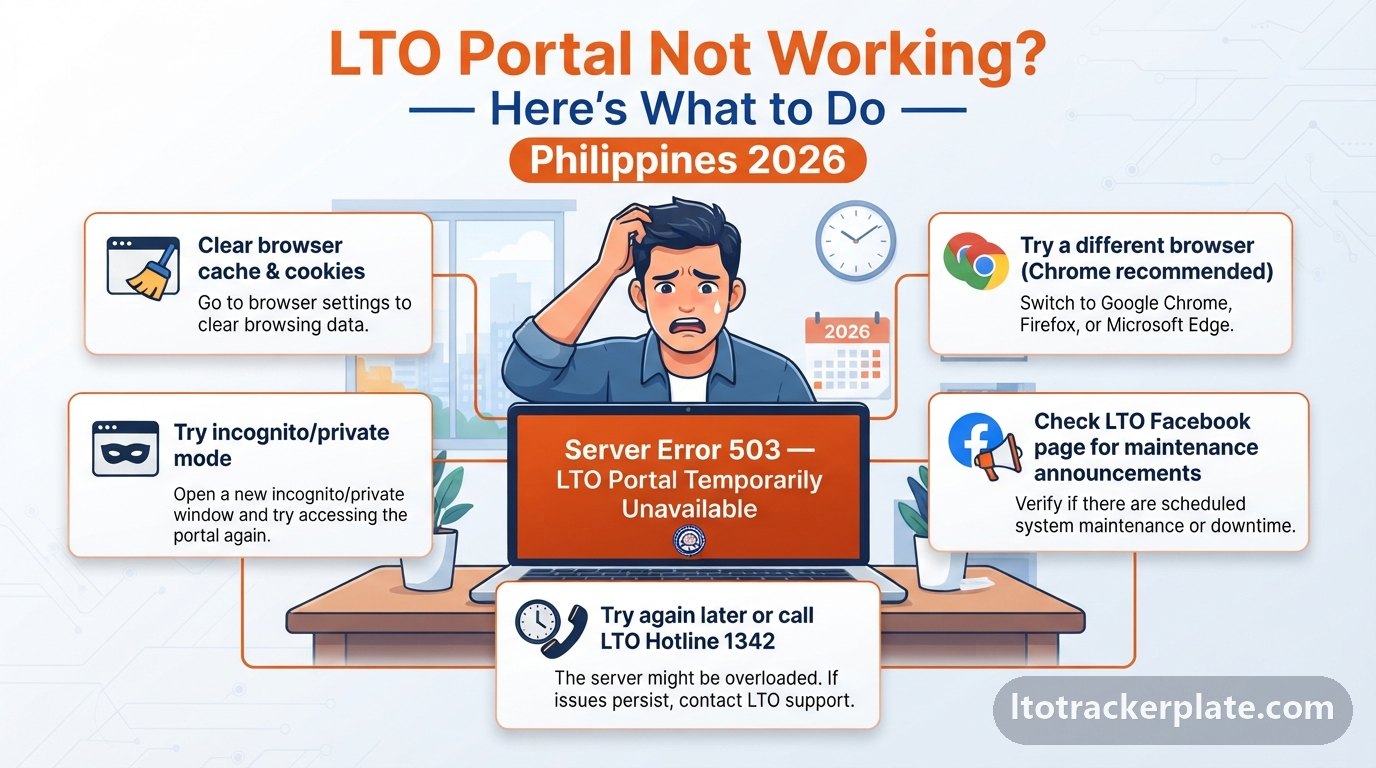
📍'No Record Found' on the LTO Tracker
This means your plate is not in the system yet or there is a typo. Recheck every character, remove extra spaces, and try the 15-digit MV file number instead of the plate number.
For brand-new registrations, allow one to two weeks for the record to appear before assuming a problem. Checking obsessively in the first few days will not make it appear faster.
If it still returns nothing after two weeks, contact your registering LTO office to confirm your details were captured correctly at registration.
📋LTO Portal Login & 'Already Registered' Problems
If you cannot log in, reset your password, confirm you are using your registered email, and make sure your account is verified. Most failures are a simple typo, not a broken account.
If the portal says your account already exists, recover it instead of registering again — duplicate accounts create record mismatches that block transactions and are a hassle to untangle later.
A dashboard that loads but shows none of your licenses or vehicles is the classic sign of a duplicate; a branch can merge the records with your ID.
💻Portal Not Loading or System Errors
A slow or blank portal usually means high traffic. Try a different browser or an incognito window, clear your cache, and access during off-peak hours such as evenings or weekends.
When the system is down entirely, you can still check plate status by texting 2600 — our SMS tool builds the correct message format so a typo does not cost you a reply.
If the site loads but rejects your details, the issue is your data, not downtime; recheck your identifiers and consider whether a duplicate account is involved.
Build your LTO SMS message →📍Tips for Accurate Tracker Results
Always double-check your numbers against your OR/CR or license, use the correct plate or MV file format, and allow the system's processing time before assuming there is an error.
Rely only on official LTO data — avoid unofficial lookup sites that ask for sensitive personal information or a fee to “reveal” your status.
When in doubt, the validator and MV file formatter tools on this site catch the small formatting mistakes that cause most failed searches.
Validate your plate format →Benefits of Using LTO Online Services
Using the LTO tracker and online services gives you back the two things branch visits cost most: time and certainty. You transact from home, and you always know exactly where your plate, license, or registration stands.
For working motorists, students, and business owners running fleets, the online shift is genuinely life-improving — it converts recurring lost days into a few minutes on a phone. These are the concrete benefits that add up.
Here is why checking and transacting online beats a walk-in trip for the great majority of motorists.
📍Skip the Lines and Track for Free
You can start most transactions and check status from home, cutting out the long queues that used to define an LTO visit. Status checking is completely free — you only pay the optional courier fee if you choose home delivery.
That means no more trips to a branch merely to ask whether your plate is ready; the tracker answers that instantly, at any hour.
For anyone who values their time, this alone justifies learning the online process once.
⚡Real-Time Status, 24/7, on Any Device
The tracker and LTMS portal give you real-time updates around the clock from your phone or computer. You see precisely where your plate, license, or registration is at any moment.
This visibility lets you plan sensibly — you know when to visit a branch, when to pay a courier, and when to simply wait a little longer rather than travel for nothing.
Mobile-friendly access means you can check between errands, at work, or from home, without needing a desktop or an office visit.
Start tracking now →Frequently Asked Questions — LTO Tracker & Portal
Quick answers to the questions motorists ask most about checking LTO status, renewing licenses, and registering vehicles online.
Can I check my vehicle plate status online for free?
Yes. Enter your plate number or 15-digit MV file number in the official LTO tracker and you'll see the status for free — no login or fee required.
Can I track my plate by plate number?
Yes, if your plate is already issued. If it isn't yet, use your MV file number, which works even before the plate is printed.
My plate says 'No Record Found' — what do I do?
Recheck for typos, remove extra spaces, and try the 15-digit MV file number. For brand-new registrations, wait one to two weeks for the record to appear.
How do I renew my LTO driver's license online?
Log in to LTMS, complete the CDE module, book a biometrics appointment, pay the fees, and finish photo-and-signature capture at your chosen branch.
How do I know when my registration expires?
Your renewal month is set by your plate's last digit and the exact date is on your OR/CR. Renew within that month to avoid penalties.
Can I pay LTO fees and violations via GCash?
Yes. The LTMS portal accepts GCash and QRPh for fees, violations, and delivery charges — just select GCash at checkout and keep the confirmation.
What is the LTO client number and where do I find it?
It's your unique LTMS ID that links all your records. It's printed on your driver's license and shown in your portal profile.
How long does LTO plate delivery take?
After 'Dispatched', expect roughly 3–10 business days in Metro Manila and 5–15 days for provincial addresses, depending on courier load and location.
What's the difference between pickup and delivery?
Branch pickup is free once your plate shows 'Available for Pickup'; home delivery costs a courier fee (₱150–₱600) but brings it to your address.
Do I need an LTMS account just to check status?
No. Status checking only needs your plate or MV file number. You need an LTMS account for transactions like renewals, registration, and paying violations.
How do I recover a forgotten LTO client number?
Use 'Forgot Client Number' with your registered email and birth date, read it off your license card, or retrieve it at any branch with a valid ID.
Is this the official LTO website?
No — this is an independent guide. We always link you to the official channels: lto.gov.ph and portal.lto.gov.ph, and never ask for your password.
In Summary — The Essentials of the LTO Tracker
The LTO Tracker and LTMS portal put plate tracking, license renewal, vehicle registration, appointments, and violation checks within reach of any Filipino motorist — no long lines required. Bookmark this page, use the free validator and tools above, and always confirm your final status through the official channels at lto.gov.ph and portal.lto.gov.ph.